Lisää tuote-JSON-LD Shopifyiin (devaajalle ja tekoälyagentillesi)
Tarkka, varmennettu tapa saada AI-haun JSON-LD Shopify-tuotesivulle — server-side ja monikielinen. Tee itse alla olevilla askeleilla, anna runbook tekoälyagentillesi, tai anna Store Operatorsin hoitaa se puolestasi.
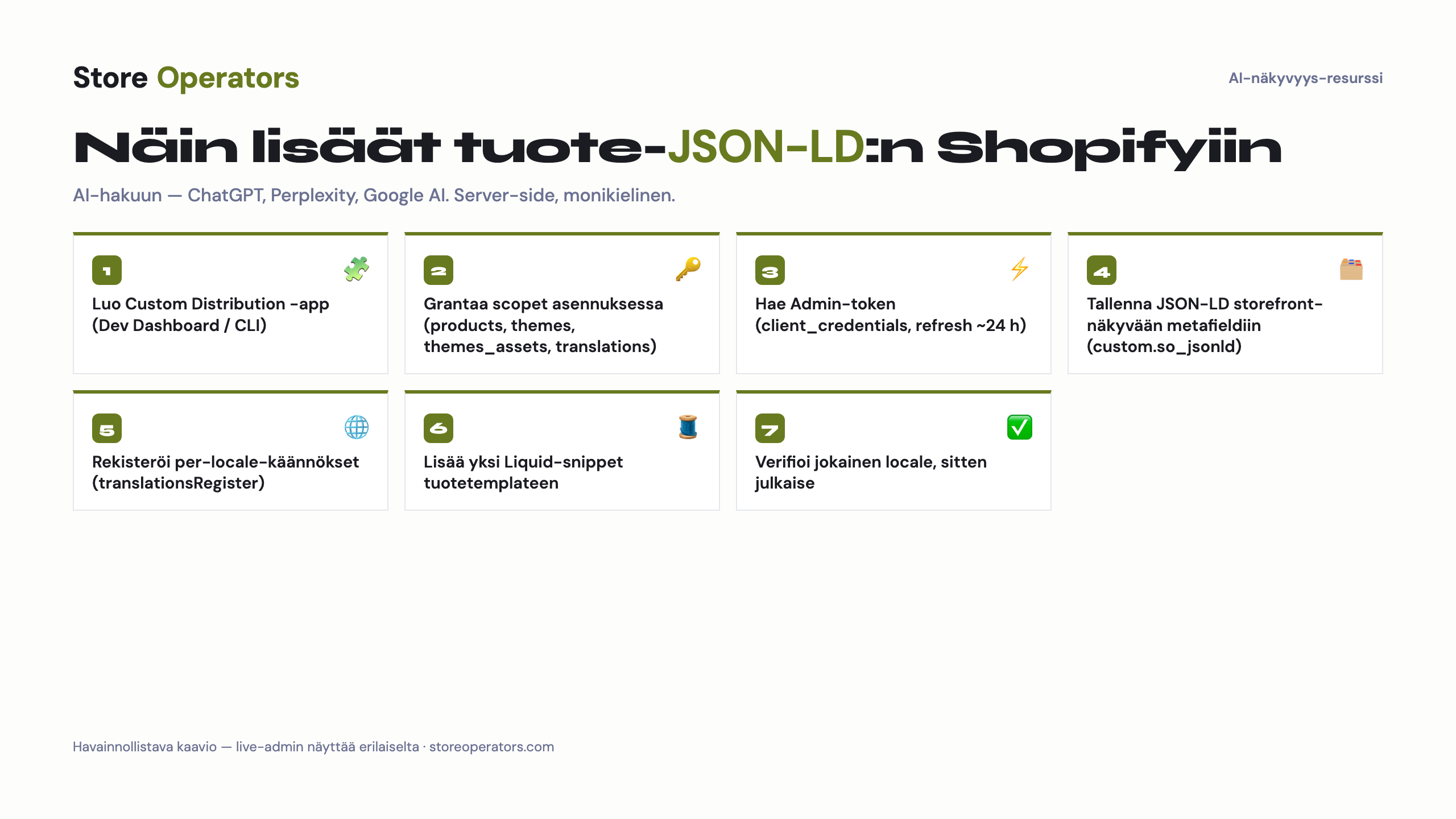
Devaajalle
- Luo metafield-määrittely `custom.so_jsonld` (tyyppi: JSON / monirivinen teksti; scope: Products) kohdassa Settings → Custom data → Products ja tee siitä storefront-näkyvä / julkisesti saatavilla — juuri tämä saatavuus (ei erillinen 'translatable'-toggle, jota ei ole) mahdollistaa per-locale-käännökset.
- Aseta sen arvoksi tälle tuotteelle (handle `your-product`) generoitu JSON-LD (alla). Tämä on your primary language-versio.
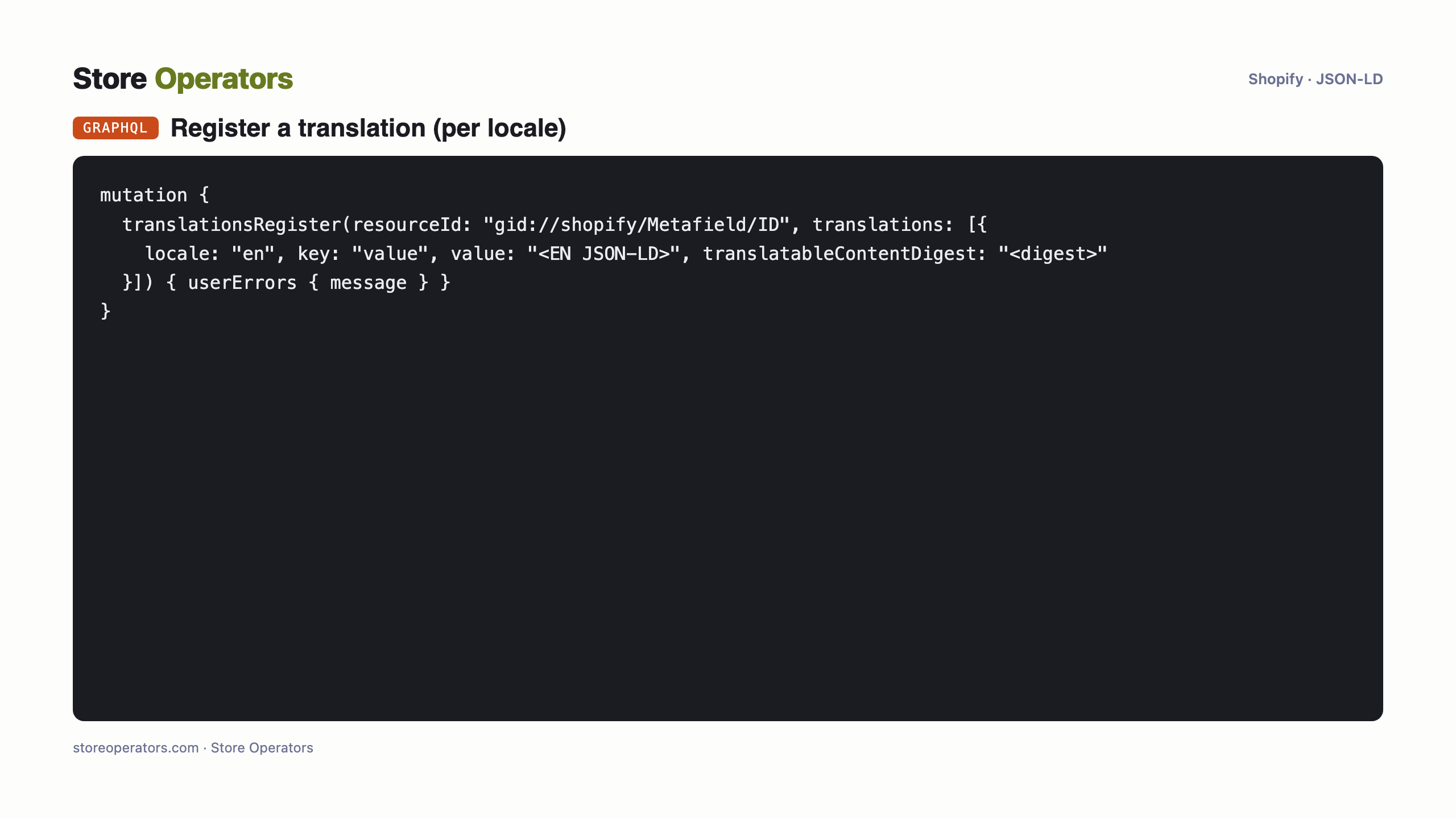
- Rekisteröi tuotteen MUUT kielet saman metafieldin KÄÄNNÖKSIKSI (ei havaittu — yksikielinen kauppa). Kukin locale saa sen kielen JSON-LD:n metafieldin käännöksenä (Translate & Adapt, tai Admin GraphQL `translationsRegister`, scope `write_translations`). Juuri siksi Outcite generoi sisällön per kieli: teeman koodiin kovakoodattua lohkoa Shopifyn käännösjärjestelmä EI näe.
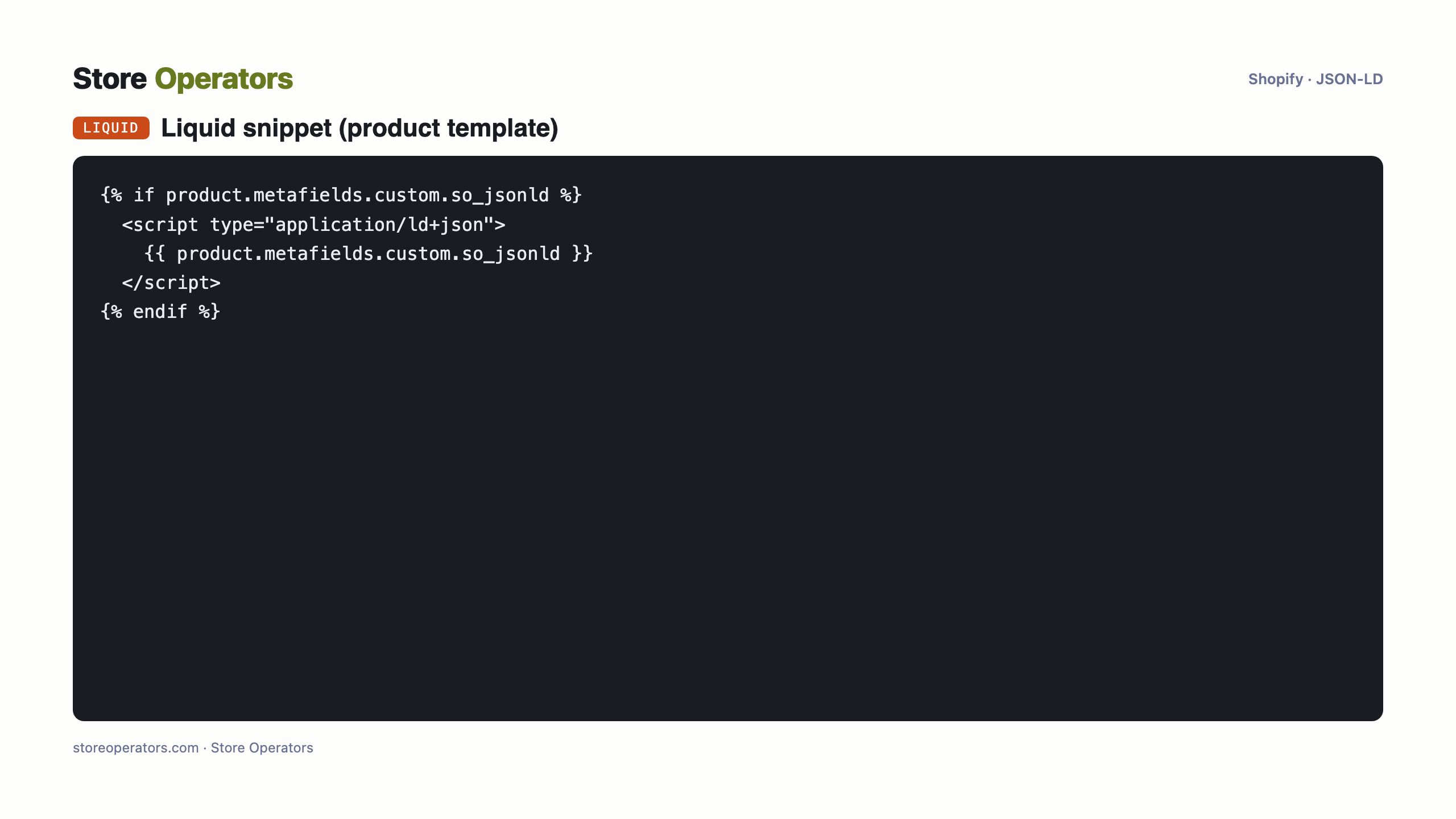
- Lisää tuotesivun templateen yksi rivi joka tulostaa metafieldin (renderöi aktiivisen localen arvon itsestään): `{% if product.metafields.custom.so_jsonld %}<script type="application/ld+json">{{ product.metafields.custom.so_jsonld }}</script>{% endif %}` — Online Store → Themes → Edit code → product-template (tai `so-jsonld.liquid`-snippet), Asset API:lla / Shopify CLI:llä.
- Koska snippet viittaa vain metafieldiin, YKSI snippet palvelee jokaista localea oikein — ei per-kieli-liimausta.
Monikielisyys hoituu metafieldin KÄÄNNÖKSILLÄ, ei koodilla. Yksi tuote, N kieliversiota = yksi metafield + N käännöstä + yksi Liquid-snippet. Outcite generoi JSON-LD:n per kieli (ajo per locale, tai batch) jotta jokainen käännös täyttyy. Älä koskaan kovakoodaa rikastettua tekstiä teemaan — Shopifyn käännösjärjestelmä ei näe sitä.
Katso jokaisen localen tuote-URLin lähdekoodi: `application/ld+json` läsnä, validi JSON, oikea kieli.
Tarkka koodi
Prompti tekoälyagentillesi — yhdistä Shopify & toteuta
Valmis kopioi–liitä-prompti omalle tekoälyagentillesi (Claude / ChatGPT). Se kertoo agentille miten se yhdistää Shopify-kauppaasi ja toteuttaa JSON-LD:n puolestasi — turvakurilla: varmuuskopio, esikatselu, verifiointi ja sinun hyväksyntäsi ennen julkaisua.
You are helping me add AI-search JSON-LD to ONE product on my Shopify store, safely.

SAFETY (follow exactly, in order):
  1. Back up first: duplicate the current theme (or export it) BEFORE any write. No exceptions.
  2. Work on an UNPUBLISHED copy / preview — never edit the live theme directly.
  3. Use a least-privilege token: only the scopes the task needs.
  4. After each change, VERIFY (fetch the page, confirm the JSON-LD renders and is valid).
  5. Do NOT publish. Show the human the preview and the verification, and let the human approve the publish.
  6. Keep the rollback ready: if anything looks wrong, restore the backed-up theme.

CONTEXT:
  - Store platform: Shopify. Product handle: your-product. Product URL: https://your-store.myshopify.com/products/your-product
  - Store locales to cover: your primary language (primary: your primary language).

CREDENTIAL — get the Admin API token (this is the step to get right):
  - Creating NEW legacy in-admin custom apps ('Settings -> Apps -> Develop apps') is blocked as of Jan 1 2026. Create the app in the Shopify Partner/Dev Dashboard (or via the Shopify CLI) instead.
  - Create a CUSTOM DISTRIBUTION app and install it on the store. Grant these scopes AT INSTALL: read_products, write_products, read_themes, write_themes, write_themes_assets, read_translations, write_translations. (This task touches NO protected customer data, so a staff admin can install it. Adding a scope later means releasing a new app version and the store approving the added scope -- a re-auth step -- so grant what is needed now.)
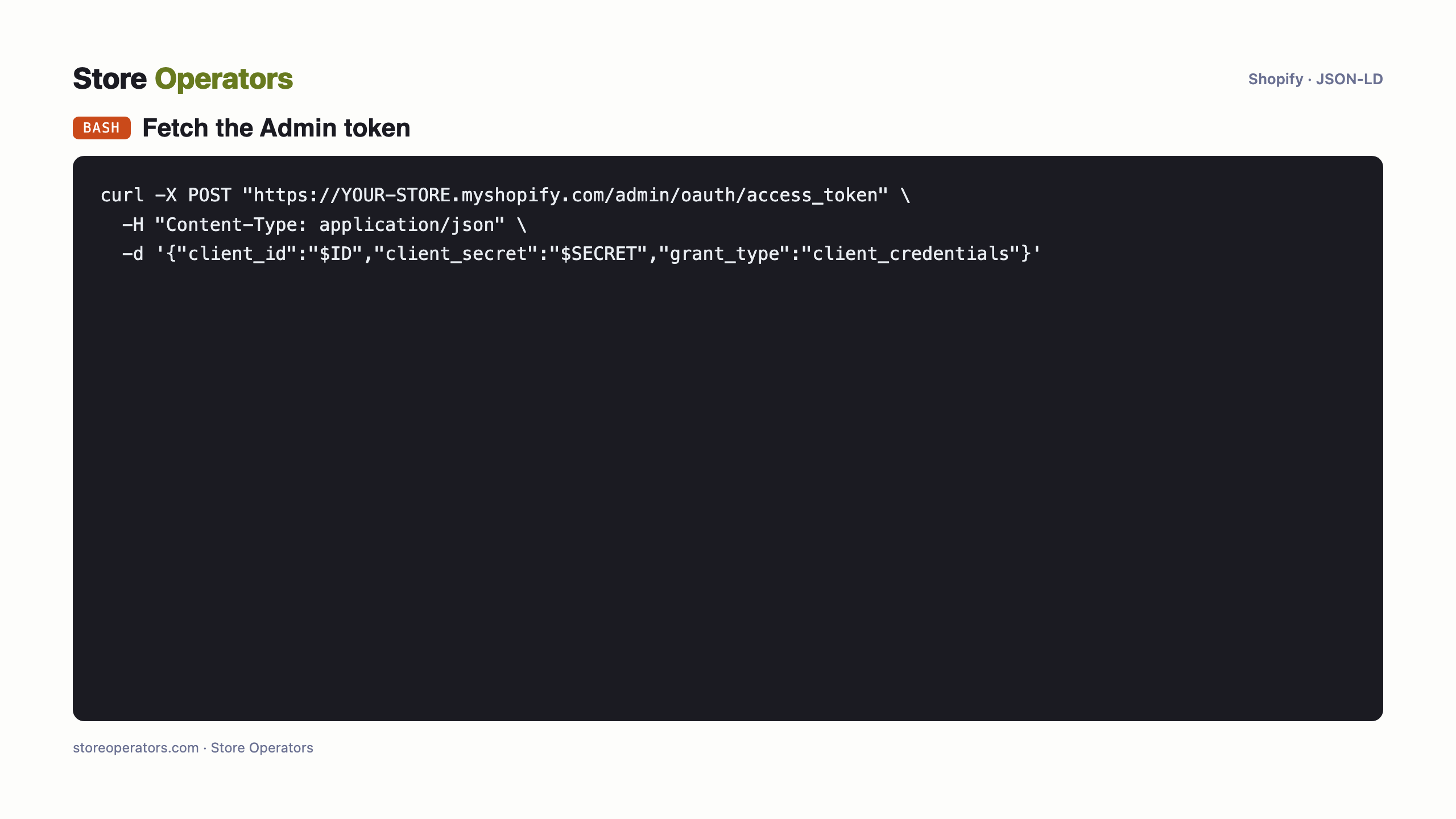
  - Installing does NOT reveal a token. Fetch it: copy the app's Client ID + API secret key from its Dev Dashboard page (or run `npx shopify app env show` once), then POST a client_credentials request to https://<store>.myshopify.com/admin/oauth/access_token to receive the Admin API access token (expires in ~24h, so refresh it before each run with the same one-line fetch). NOTE: the app's API SECRET is NOT the access token -- using the secret directly returns 401.
  - Put the token in .env as SHOPIFY_ACCESS_TOKEN; reference it by name; never print its value.

TASK:
  1. Create a translatable metafield definition `custom.so_jsonld` (JSON / multi-line text, Products scope, Translatable).
  2. Set its value on product `your-product` to the your primary language JSON-LD I provide below.
  3. For each other locale (none), register the corresponding-language JSON-LD as a translation of that metafield via Admin GraphQL `translationsRegister`.
  4. Add this snippet to the product template so the theme prints the metafield (do this on an UNPUBLISHED theme copy):
     {% if product.metafields.custom.so_jsonld %}<script type="application/ld+json">{{ product.metafields.custom.so_jsonld }}</script>{% endif %}
  5. VERIFY on the preview: fetch the product URL for each locale and confirm the <script application/ld+json> is present and is valid JSON in the right language.
  6. STOP. Show me the preview links + verification. I will approve the publish myself.

PRIMARY-LOCALE (your primary language) JSON-LD:
{}

For the other locales, ask me for each language's JSON-LD (Outcite generates one per language) before registering its translation.
Mitä ihmiset kysyvät tekoälyltään
- Mikä on prompti jolla yhdistän Clauden Shopify-kauppaan lisätäkseni tuote-JSON-LD:n?
- Käytä tämän sivun runbookia — liitä se Claudeen. Se yhdistää Shopify-kauppaasi omilla tunnuksillasi ja lisää schema.org-JSON-LD:n, varmuuskopiolla, esikatselulla, verifioinnilla ja sinun hyväksynnälläsi ennen julkaisua.
- Miten yhdistän ChatGPT:n Shopify-kauppaani lisätäkseni schema.org-JSON-LD:n?
- Sama runbook toimii ChatGPT:llä (tai millä tahansa kyvykkäällä agentilla): se kirjautuu kauppaasi ja injektoi JSON-LD:n server-side, turvallisesti, ja pysähtyy hyväksyntääsi ennen julkaisua.
- Voiko tekoälyagentti lisätä tuote-JSON-LD:n Shopifyiin AI-hakua varten (ChatGPT, Perplexity, Google AI)?
- Kyllä — server-side (pelkkää client-side-JavaScriptiä AI-crawlerit eivät luotettavasti näe). Tee se tämän sivun agentti-runbookilla, anna devaajalle, tai anna Store Operatorsin hoitaa se.
Lähteet
- Legacy custom apps can't be created after Jan 1 2026 (Shopify changelog)
- Shopify Admin API — access tokens (incl. client_credentials)
- Shopify themeFilesUpsert (theme file writes; needs write_themes_assets)
- Shopify — manage translated content (metafields via translationsRegister)
- Shopify Liquid translate filter (only locale-file strings translate)
- Google — generate structured data with JavaScript (Google renders JS)
- Independent AI-crawler behaviour testing (JS execution)
Näy ja tule suositelluksi tekoälyssä
Store Operators tekee kaupastasi AI-näkyvän ja agenttivalmiin — ilmaisesta auditista puolestasi rakennettuun datalayeriin ja agenttiseen kauppaan.