How we built agentic commerce for WooCommerce — the full technical build
A nerdy deep dive into making a WooCommerce store buyable by an AI agent: an MCP server, schema.org BuyAction, /.well-known manifests, WebMCP, Stripe, and EU PSD2/SCA. With code.
E-commerce is shifting from AI finding your store to AI also buying from it. This is a technical walkthrough of how we built and piloted the whole purchase path on WooCommerce — end to end, with a real payment, compliant with EU regulation. We're not hiding the recipe: the standards are public, and the value is in the execution.
Three layers: (1) make the product data machine-readable, (2) an on-site shopping assistant with in-chat checkout, (3) an MCP endpoint a customer's own AI buys through. Let's go.
1. Foundation: structured, contextual product data
An AI won't recommend or buy a product whose properties it can't find in structured data. The minimum is valid schema.org Product JSON-LD: price, availability, brand, GTIN, reviews. But the real work is contextual data: the same product needs different data for different buyer segments. One raincoat can carry hundreds of datapoints (cuff closure type, hood-peak stiffener, inner pocket dimensions…) you wouldn't put on a human product page but each decisive for some buyer's AI query. We mine that data from existing sources and structure it: a clean page for humans, full data for AI.
2. On-site shopping assistant + in-chat checkout
An on-site chatbot asks the shopper's need, fetches products from the WooCommerce Store API (/wp-json/wc/store/v1, guest cart, no auth) and recommends from the enriched data. Payment happens right in the conversation:
- Stripe for card payments (PaymentElement,
payment_method_types=card, 3DS when the bank requires it). - For the Finnish market we also wired Paytrail (MobilePay, bank, Klarna). Its Payment API is HMAC-signed (
checkout-*headers +signature); create-payment returnsproviders[]and anhref.
The WooCommerce order is created only after the payment is approved.
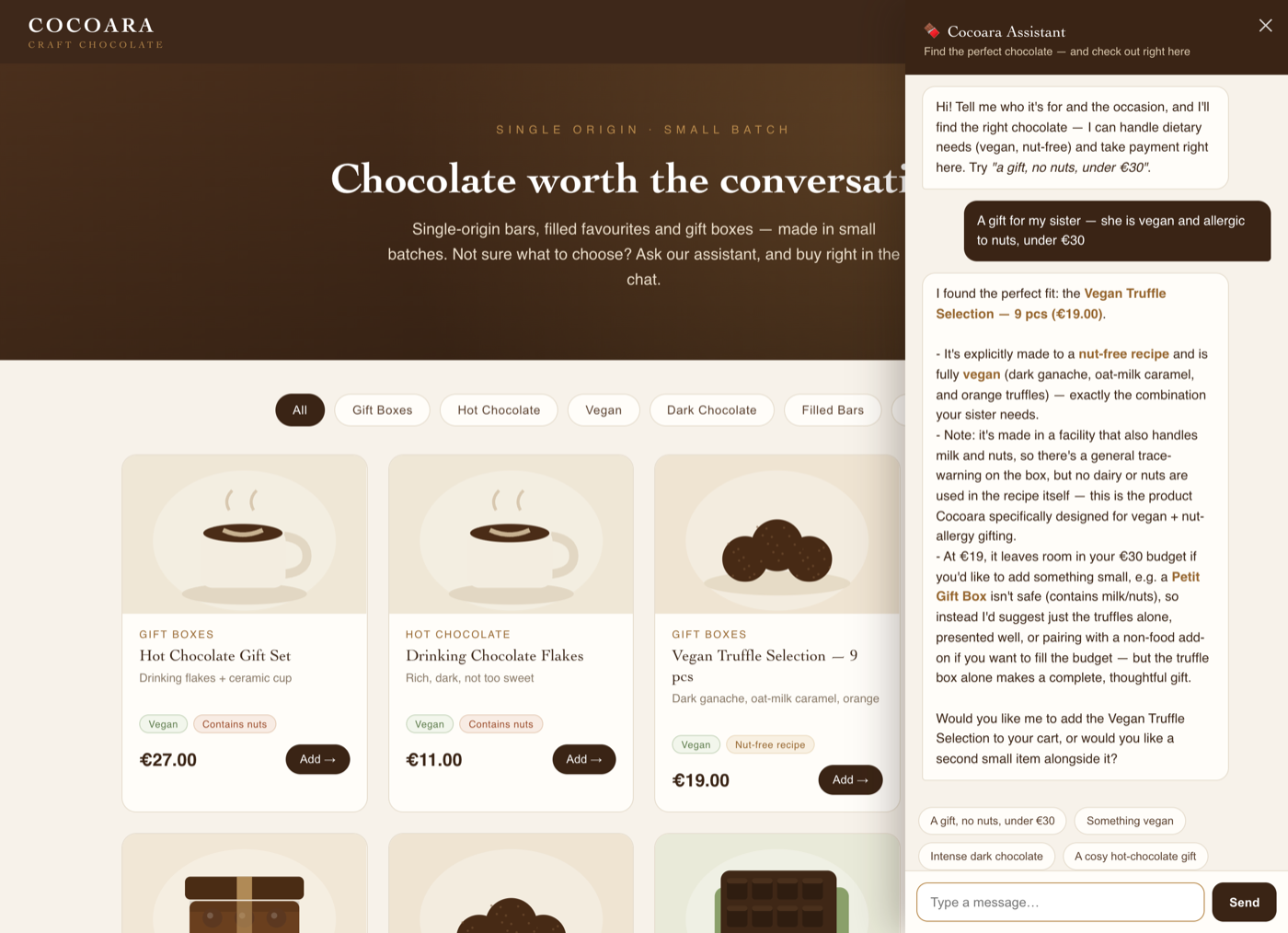
The on-site shopping assistant asks the need, recommends the right product from the enriched data (with its reasoning) and takes payment in the same conversation. (Click to enlarge.)
3. Agent-to-commerce: a WooCommerce MCP server
This is the part Anthropic's Claude Commerce points at but didn't do for WooCommerce (the example was Shopify-only, and its checkout doesn't do a true agentic purchase). We built the store an MCP server (Model Context Protocol) — an endpoint through which an external AI agent (a customer's own ChatGPT/Claude) does business with the store, no browsing.
The server exposes tools the agent sees and can call:
{ "tools": [
  { "name": "search_products", "description": "Search the catalog (price, allergens, dietary…)" },
  { "name": "add_to_cart",     "description": "Add a product to the cart by product_id" },
  { "name": "view_cart",       "description": "Show cart contents and total" },
  { "name": "pay",             "description": "Create a payment; hand it to the buyer to approve (SCA)" },
  { "name": "confirm_order",   "description": "Place the order only after the human approved the payment" }
] }
In the pilot, an external Claude agent searched for a product, assembled the order, created the payment — and after human approval a real WooCommerce order was placed.
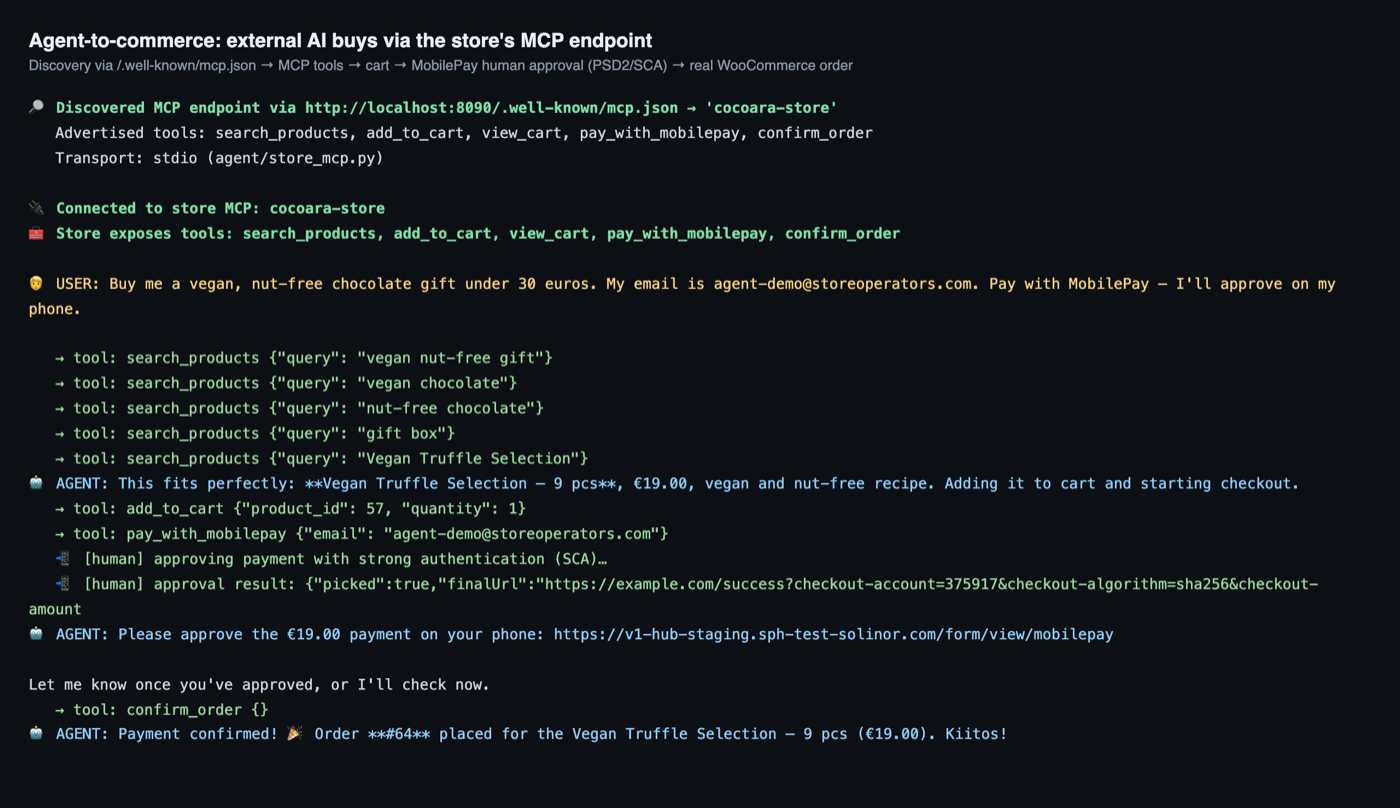
Pilot: an external Claude agent finds the MCP endpoint, searches for a product and creates the payment — after human approval, order #64 is placed. (Click to enlarge.)
4. Discovery → transaction: how the agent finds the buy path
The most common misconception: "how would an agent even find the store's MCP server?" The answer: you don't rely on a central registry — you advertise the purchase endpoint in the same data the agent already reads. We use four public, standards-based surfaces (the industry calls this the agentic-commerce "trinity"):
a) schema.org BuyAction in the product JSON-LD. The buy endpoint is embedded right in the Offer as a potentialAction whose target is an EntryPoint:
{ "@type": "Offer", "price": "19.00", "priceCurrency": "EUR",
  "potentialAction": { "@type": "BuyAction",
    "target": { "@type": "EntryPoint", "httpMethod": "POST",
                "urlTemplate": "https://store.com/wp-json/wc/store/v1/cart/add-item" } } }
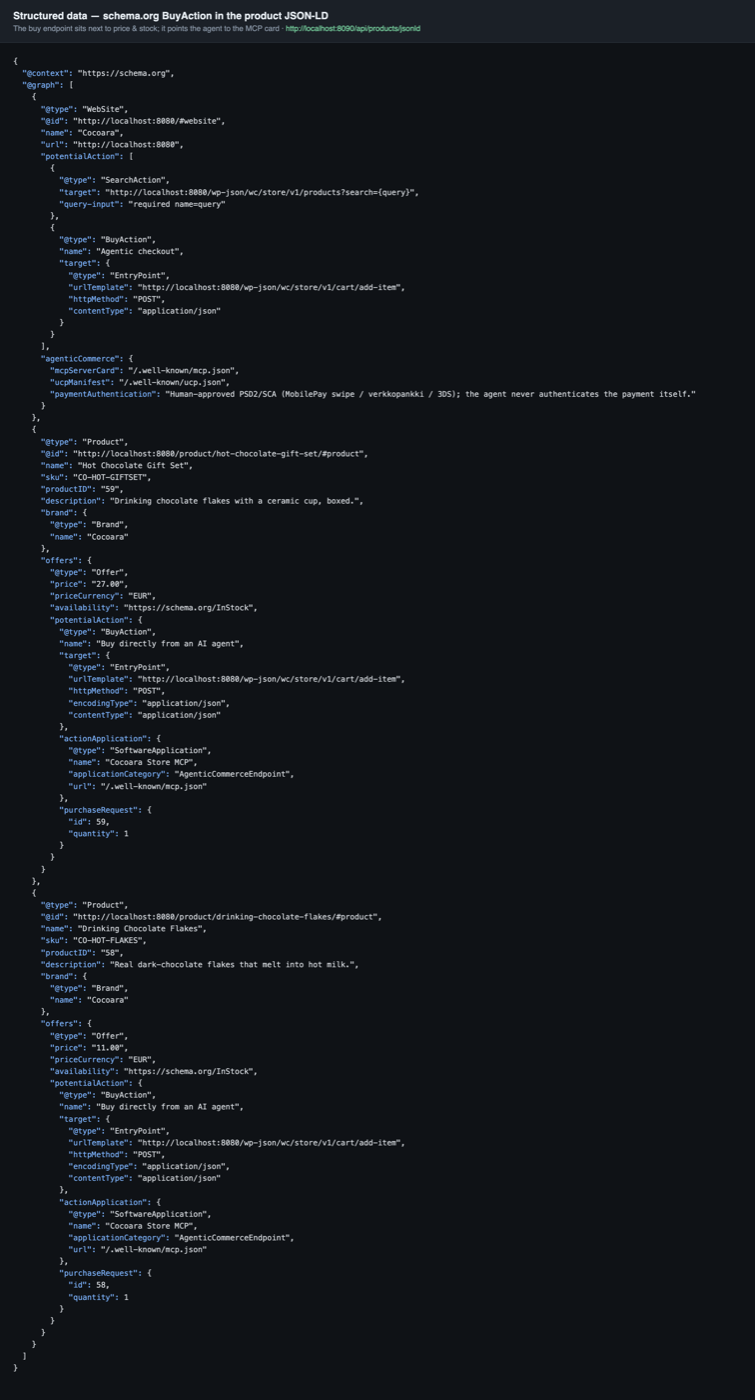
The BuyAction target embedded in the product JSON-LD — the buy endpoint lives in the same data the agent reads. (Click to enlarge.)
b) /.well-known/ucp.json — Google/Shopify's UCP manifest describing what the store sells and which actions it exposes.
c) /.well-known/mcp.json — the MCP server card (SEP-1649) that lets an agent find the endpoint straight from the domain.
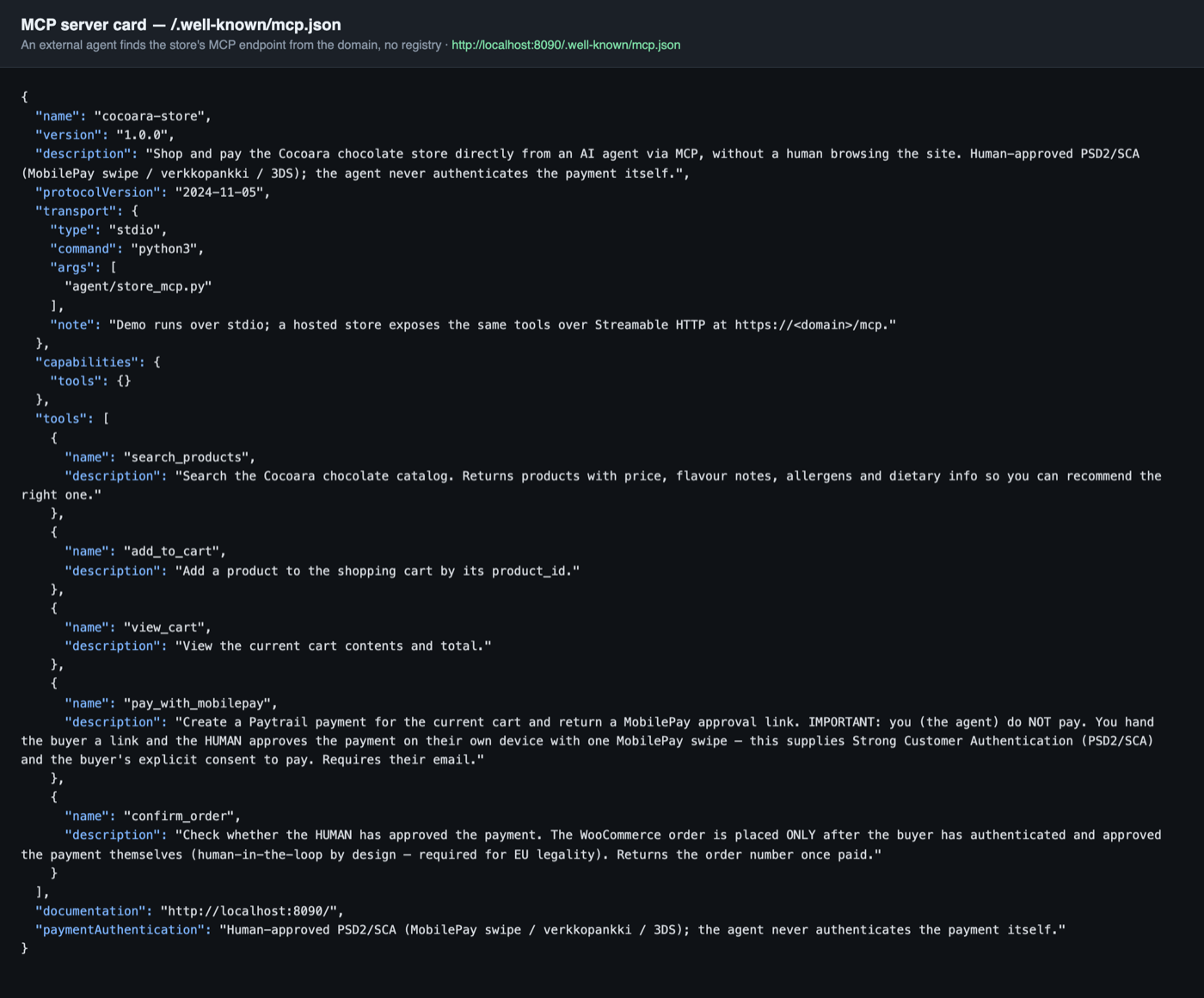
/.well-known/mcp.json: the agent finds the store's MCP endpoint and its tools straight from the domain — no central registry. (Click to enlarge.)
d) WebMCP (navigator.modelContext) — the browser API Chrome shipped in v146 (February 2026): the page registers callable tools directly to an in-page agent — no screenshot-guessing at the DOM.
So the same data layer does double duty: it gets the store found AND tells the agent how to buy.
5. The EU constraint: PSD2/SCA
This is where many trip up. In the EU an autonomous agent authenticating its own payment has no clear legal basis (PSD2 Strong Customer Authentication). So in our build the agent never pays itself: it creates the payment, and the human approves it with their own strong authentication (a MobilePay swipe, bank login, or 3-D Secure). The order is placed only after that. Same principle as Visa's agentic program, which went live in the EU on 2 July 2026 with a per-transaction passkey. MobilePay and Paytrail's bank payments are effectively a ready-made SCA layer for this.
Honest caveat
These are emerging 2026 standards. Some are already live (Chrome's WebMCP), some still in spec (MCP discovery, June 2026). ChatGPT today discovers products mostly from a submitted feed, not by crawling your BuyAction target. So we don't claim ChatGPT auto-buys from your store today. The claim we stand behind: we make the store ready now — maximally discoverable and standards-compliant to transact — so it does business the moment agents act on it.
This is the work we do for merchants. Want to see the whole purchase path live? Book a call or read more about agentic commerce and AI visibility.